Platform Nano Hard Reset and Factory Reset procedure.

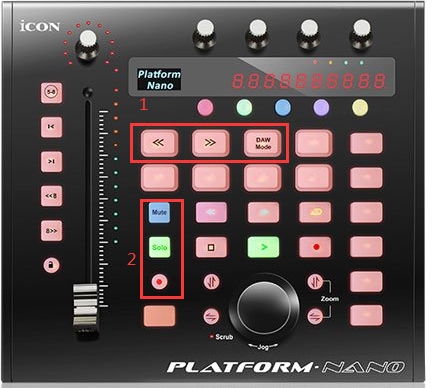
To attempt to reset a Platform Nano to Factory default settings; turn off the unit, and press and hold the 3 buttons shown in box 1 (the top box). While holding these buttons turn the unit on.
To attempt to reset a Platform Nano to Firmware Upgrade mode; turn off the unit, then press and hold the three buttons shown in box 2 (the bottom box). While holding these buttons turn the unit on, and you should be able to restore the unit's firmware using the iMap.
If the iMap is not able to connect after performing either or both of these resets, the USB firmware is likely damaged or erased and the unit will require service.
Comments
0 comments
Article is closed for comments.