I confirm. It doesn´t help. It only works within the 8-count fader Bank which is a total "No Go" for me.
I chose a single fader Controller on Purpose to edit any active channel. It doesn´t make sense to me having Groups of 8 on a single fader Controller. Too bad I already sold my CC121 :-( I was totally sure the Nano would work the same way but now I´m afarid I Need to return Platform Nano and get another CC121.
I need the channel select to allow me to scroll through the channels and, importantly, scroll the computer screen as the selected channel hits the edge of the displayed channels.
I have a second monitor specifically set up for this scenario and it is really disappointing that it doesn't work.
I've only recently started using one, and I am also having this problem. It only works within the 8 count fader bank, making it useless for my work... Running Cubase 10.5/Catalina...
If this is not addressed and resolved soon enough, I'll have no choice but to get rid of it from my personal studio, and never recommend it to my clients. (I work primarily in acoustics and studio integration.) If this problem has not been addressed since July of last year, it calls to question the basic trust that one can place on Icon Pro Audio.
That is a bit harsh :-) It seems like a trustworthy professional company to me. They are merely adhering to a technical standard - the Mackie protocol - that was not designed for our current day use case: controlling many many (64, 128, ...) tracks from within a DAW without hassle. I believe Steinberg themselves are the only one with a controller that pulls this off (in Cubase at least). Don't know if they were just smarter or more creative in implementing Mackie, or if they use something proprietary, but it works like a charm. It is just so old that is misses other nice-to-have functionality, like displaying the track name.
I was unable to get into the pages to edit because Page up / down would default to FX send. But now that`s fixed with this bit of info. Thank you,
Yes the being locked into banks of eight is a pain.
I have been using X touch for years and that does not have the problem. Behringer found the way around.
I might have to get it out again. Was trying to downsize the desk clutter. Using console 1 and selecting tracks has the info on Nano update but the fader stays at the last block of eight.
My A& H QU24 uses 3 mackie inputs as 1, 2 and 3 to give clear access.
Spend so much wasted time sorting what should be simple on a standard protocol. Otherwise fine and pretty colours in a gloomy world
@bluerg: Are you 100% sure about the x touch? And are you talking about x touch one?
I'm pretty sure it has the same issue. At least in Mackie Protocol mode.
CC121 and Avid Eucon controllers are the only devices picking up any channel without issues I'm aware of.

Comments
11 comments
Not working
not working. Cubase freezes
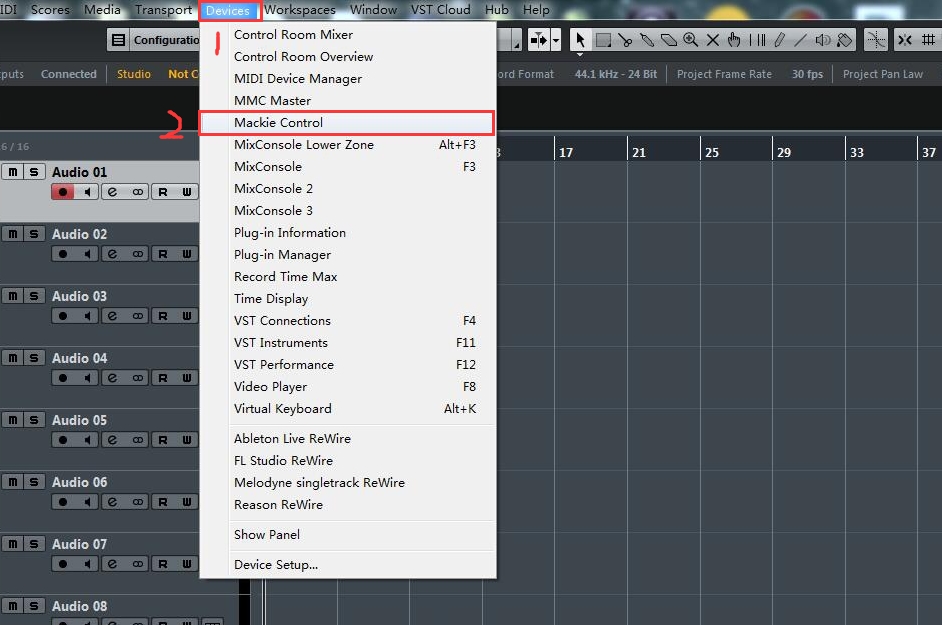
First of all. In Cubase 10, this is now under:
Studio->More Options->Mackie Control
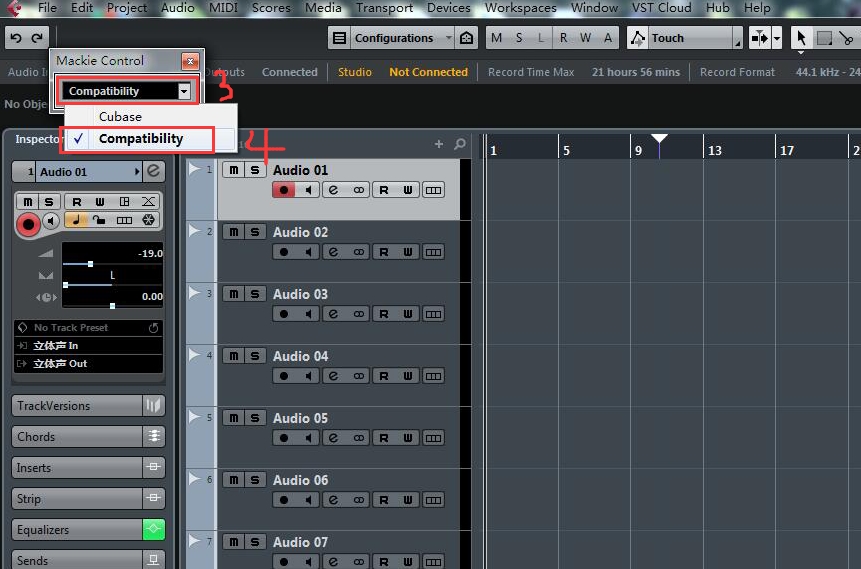
Second: this does not help.
Outside of the 8-count fader-bank you are in, the fader won't follow where you are working. Real Pain.
I confirm. It doesn´t help. It only works within the 8-count fader Bank which is a total "No Go" for me.
I chose a single fader Controller on Purpose to edit any active channel. It doesn´t make sense to me having Groups of 8 on a single fader Controller. Too bad I already sold my CC121 :-( I was totally sure the Nano would work the same way but now I´m afarid I Need to return Platform Nano and get another CC121.
I confirm - this is not a solution.
I need the channel select to allow me to scroll through the channels and, importantly, scroll the computer screen as the selected channel hits the edge of the displayed channels.
I have a second monitor specifically set up for this scenario and it is really disappointing that it doesn't work.
Not working here either with Cubase 10.5 and Platform M+
I've only recently started using one, and I am also having this problem. It only works within the 8 count fader bank, making it useless for my work... Running Cubase 10.5/Catalina...
If this is not addressed and resolved soon enough, I'll have no choice but to get rid of it from my personal studio, and never recommend it to my clients. (I work primarily in acoustics and studio integration.) If this problem has not been addressed since July of last year, it calls to question the basic trust that one can place on Icon Pro Audio.
That is a bit harsh :-) It seems like a trustworthy professional company to me.
They are merely adhering to a technical standard - the Mackie protocol - that was not designed for our current day use case: controlling
many many (64, 128, ...) tracks from within a DAW without hassle.
I believe Steinberg themselves are the only one with a controller that pulls this off (in Cubase at least). Don't know if they were just smarter or more creative in implementing Mackie, or if they use something proprietary, but it works like a charm. It is just so old that is misses other nice-to-have functionality, like displaying the track name.
same thing happening to me and no, this method does not help....
I was unable to get into the pages to edit because Page up / down would default to FX send. But now that`s fixed with this bit of info. Thank you,
Yes the being locked into banks of eight is a pain.
I have been using X touch for years and that does not have the problem. Behringer found the way around.
I might have to get it out again. Was trying to downsize the desk clutter. Using console 1 and selecting tracks has the info on Nano update but the fader stays at the last block of eight.
My A& H QU24 uses 3 mackie inputs as 1, 2 and 3 to give clear access.
Spend so much wasted time sorting what should be simple on a standard protocol. Otherwise fine and pretty colours in a gloomy world
@bluerg: Are you 100% sure about the x touch? And are you talking about x touch one?
I'm pretty sure it has the same issue. At least in Mackie Protocol mode.
CC121 and Avid Eucon controllers are the only devices picking up any channel without issues I'm aware of.
Please sign in to leave a comment.