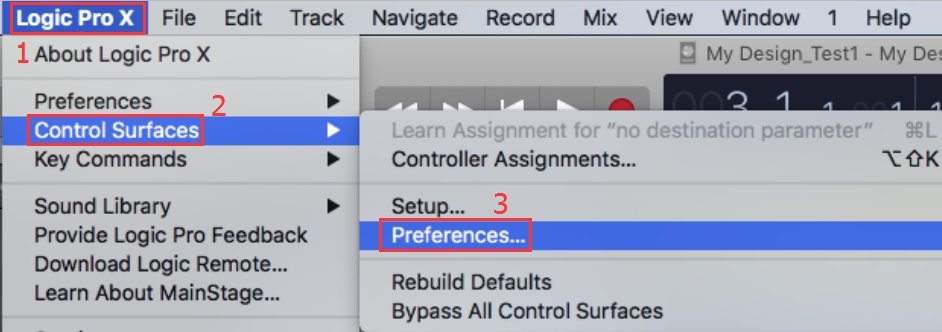
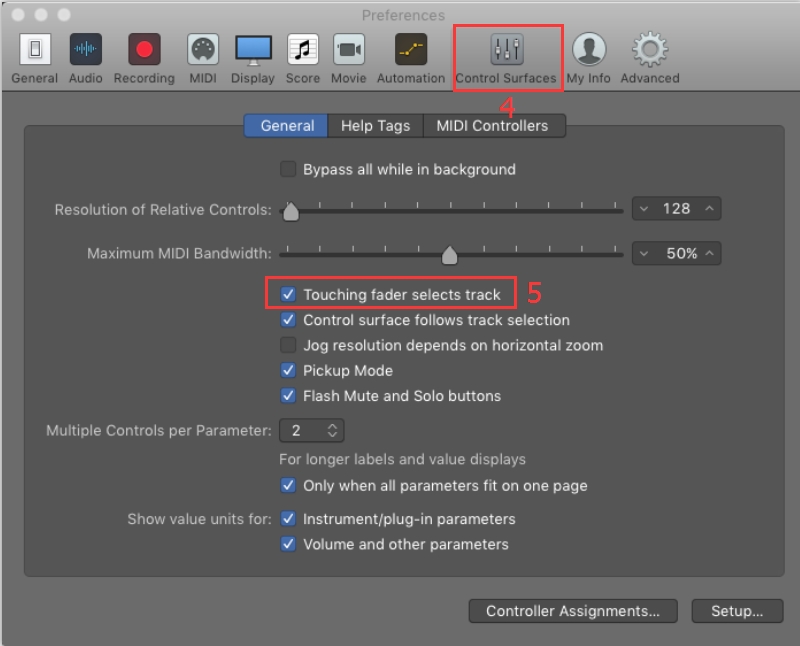
LOGIC PRO X: How To Enable My Touch Sensitive Faders In Logic Pro? iCON Support Admin August 12, 2020 05:07 Updated Related articles FAQ: How do I access basic settings and perform various self tests on my iCON V1-M and V1-X Controllers? LOGIC PRO X: I'm having trouble with my control surface in Logic but nothing will solve it! FAQ: How do I recover my V-Series or P-Series controller from a failed firmware update? V1-SERIES: Jog Wheel Lock and Resolution Update For V1-M Series DAW Controllers. PRO TOOLS - How Do I Control Sends in Pro Tools Using the Platform B+ Comments 2 comments Sort by Date Votes Dima Teimurazov November 28, 2017 15:00 Please help me! How to disable touch in qcon pro x faders? BeCz, when i touch faders in midi channel, it changes pitch tone! Thank you 0 Dima Teimurazov November 28, 2017 15:00 In Cubase daw 0 Please sign in to leave a comment.

Comments
2 comments
Please help me! How to disable touch in qcon pro x faders? BeCz, when i touch faders in midi channel, it changes pitch tone!
Thank you
In Cubase daw
Please sign in to leave a comment.